
Camera Angles

Where the camera sits and how much of the subject it takes in. Every keyword shows its own picture beside a plain description — tap an image to see it up close.

Showing 25 of 25

  • Eye-Level View — Positions the camera at the subject's eye height for a natural, neutral relationship
    01

    Eye-Level View

    Positions the camera at the subject's eye height for a natural, neutral relationship.

  • High-Angle View — Places the camera above the subject, looking downward to reveal surfaces and surroundings
    02

    High-Angle View

    Places the camera above the subject, looking downward to reveal surfaces and surroundings.

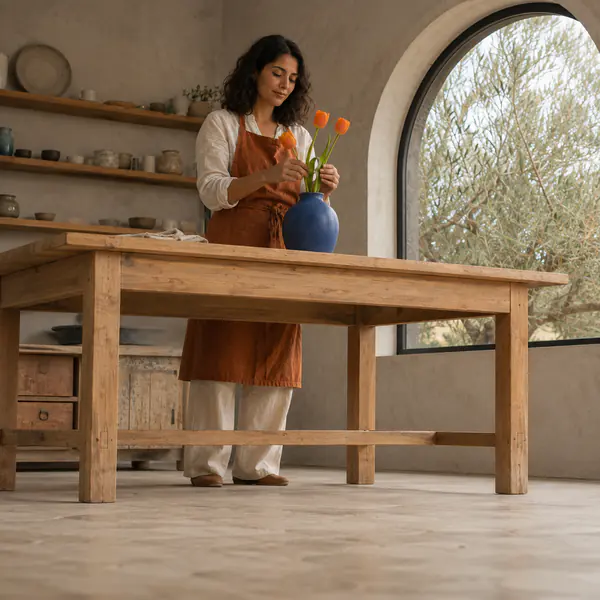
  • Low-Angle View — Places the camera below the subject, looking upward to emphasize height and presence
    03

    Low-Angle View

    Places the camera below the subject, looking upward to emphasize height and presence.

  • Bird's-Eye View — Observes a broad scene from far above, revealing spatial relationships and movement patterns
    04

    Bird's-Eye View

    Observes a broad scene from far above, revealing spatial relationships and movement patterns.

  • Worm's-Eye View — Looks almost vertically upward from the lowest practical position beneath the subject
    05

    Worm's-Eye View

    Looks almost vertically upward from the lowest practical position beneath the subject.

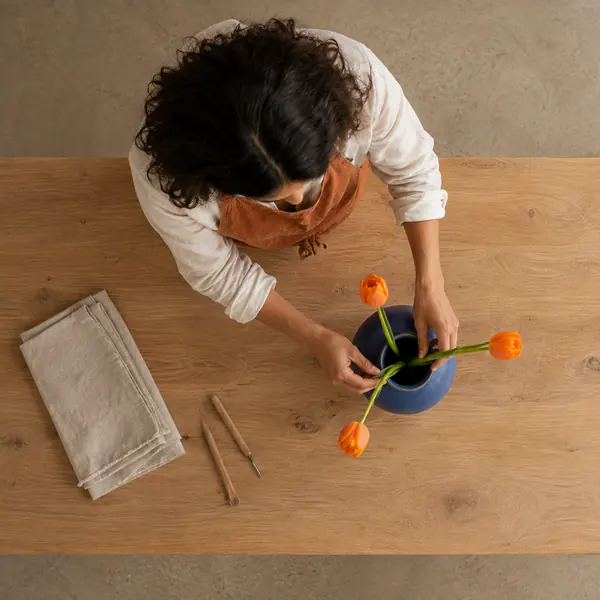
  • Direct Overhead View — Points the camera straight down at close range, keeping the surface plane parallel
    06

    Direct Overhead View

    Points the camera straight down at close range, keeping the surface plane parallel.

  • Ground-Level View — Sets the camera directly on the ground to foreground nearby texture and scale
    07

    Ground-Level View

    Sets the camera directly on the ground to foreground nearby texture and scale.

  • Frontal View — Faces the subject straight on, keeping its front plane parallel to the camera
    08

    Frontal View

    Faces the subject straight on, keeping its front plane parallel to the camera.

  • Direct Side View — Aligns the camera perpendicular to an object's side for clear silhouette and proportions
    09

    Direct Side View

    Aligns the camera perpendicular to an object's side for clear silhouette and proportions.

  • Three-Quarter Front View — Rotates the subject partly away, showing the front and one side simultaneously
    10

    Three-Quarter Front View

    Rotates the subject partly away, showing the front and one side simultaneously.

  • Rear View — Positions the camera directly behind the subject, centering its back-facing plane
    11

    Rear View

    Positions the camera directly behind the subject, centering its back-facing plane.

  • Clockwise Dutch Angle — Rotates the camera clockwise so vertical lines lean and the horizon slopes rightward
    12

    Clockwise Dutch Angle

    Rotates the camera clockwise so vertical lines lean and the horizon slopes rightward.

  • Over-the-Shoulder View — Frames past one person's shoulder toward another subject or object of attention
    13

    Over-the-Shoulder View

    Frames past one person's shoulder toward another subject or object of attention.

  • Point-of-View Shot — Shows exactly what a character would see from their current position and gaze
    14

    Point-of-View Shot

    Shows exactly what a character would see from their current position and gaze.

  • Wide Shot — Includes the full subject plus substantial surroundings to establish spatial context
    15

    Wide Shot

    Includes the full subject plus substantial surroundings to establish spatial context.

  • Full Shot — Frames a person completely from head to feet with limited surrounding space
    16

    Full Shot

    Frames a person completely from head to feet with limited surrounding space.

  • Medium Shot — Frames a person roughly from the waist upward for gestures and facial detail
    17

    Medium Shot

    Frames a person roughly from the waist upward for gestures and facial detail.

  • Close-Up — Fills most of the frame with a face or single object for detail
    18

    Close-Up

    Fills most of the frame with a face or single object for detail.

  • Extreme Close-Up — Isolates a very small subject area so fine features dominate the entire frame
    19

    Extreme Close-Up

    Isolates a very small subject area so fine features dominate the entire frame.

  • Detail Shot — Selects one meaningful component of a larger subject and excludes most context
    20

    Detail Shot

    Selects one meaningful component of a larger subject and excludes most context.

  • Macro Shot — Frames a tiny subject at high magnification, revealing details invisible at ordinary distance
    21

    Macro Shot

    Frames a tiny subject at high magnification, revealing details invisible at ordinary distance.

  • Establishing Shot — Presents the complete location before closer views, clarifying where subjects are situated
    22

    Establishing Shot

    Presents the complete location before closer views, clarifying where subjects are situated.

  • Environmental Portrait — Frames a person within enough workplace or habitat context to explain their role
    23

    Environmental Portrait

    Frames a person within enough workplace or habitat context to explain their role.

  • Headshot — Frames the face and upper shoulders tightly for identification or professional presentation
    24

    Headshot

    Frames the face and upper shoulders tightly for identification or professional presentation.

  • Frame Within a Frame — Positions the camera so an opening or foreground structure surrounds the main subject
    25

    Frame Within a Frame

    Positions the camera so an opening or foreground structure surrounds the main subject.